How to Install VIDIZMO from Zoom App Marketplace
VIDIZMO integrates with Zoom to fetch, process, and store your cloud meeting recordings. This article covers installing VIDIZMO directly from the Zoom App Marketplace.
Prerequisites
- The Conferencing permission is enabled for your group.
- Administrative rights in your Zoom account or the account whose credentials you will use for installation.
- A Zoom client, using which you have recorded an online meeting on your Zoom Cloud account.
Enter Portal URL
- Search for VIDIZMO on the Zoom App Marketplace and select Visit Site to Install.
- On the Install Zoom App page, enter your VIDIZMO Portal URL (e.g.,
https://yourportal.enterprisetube.com). - Select Proceed.
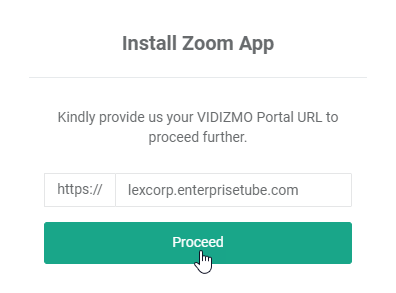
NOTE: If you are already logged in to your VIDIZMO Portal in your current browser session with the Conferencing permission enabled, you can configure Zoom app settings in the next step. Otherwise, you will be required to log in first.
Configure Zoom App
Configure the Zoom app settings such as Filter Accounts, Concatenate Recordings, Delete Conference Recordings, Preserve Password, Publish As, and Default Publish Settings. For step-by-step instructions, see How to Configure Zoom Server-to-Server OAuth App in VIDIZMO.
Authorize the App
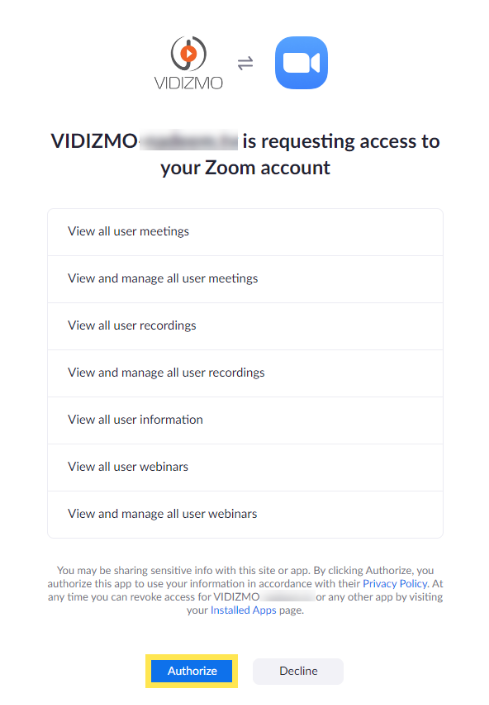
- After selecting Save Changes, you are redirected to Zoom to sign in. Enter the credentials of a user with administrative rights in the Zoom account.
- On the authorization page, review the permissions VIDIZMO is requesting and select Authorize.
Enable Zoom App
- After granting permission, you are routed back to the portal's Video Conferencing apps page. Turn on the toggle for Zoom to activate the app.
After enabling the app, the following status information is displayed:
- Sync Status Displays Running or Finished to indicate the sync status. In case of a failure, an error log is shown.
- Last Synced At The latest date and time at which the processor fetched videos from Zoom Cloud.
- Authorization Status Indicates whether the app has been successfully authorized by Zoom.
Troubleshooting
For common issues with syncing meetings from Zoom, see Troubleshooting Zoom Integration Issues.