Managing Agents
This article describes the management options available for agents in VIDIZMO. Use these options to modify, duplicate, remove, or embed existing agents.
For details on creating new agents, see Creating Agents.
Access Agent Management
To access agent management options, go to Portal Settings > Agent Management. The Agent Management page displays all configured agents for the portal with available actions for each agent.
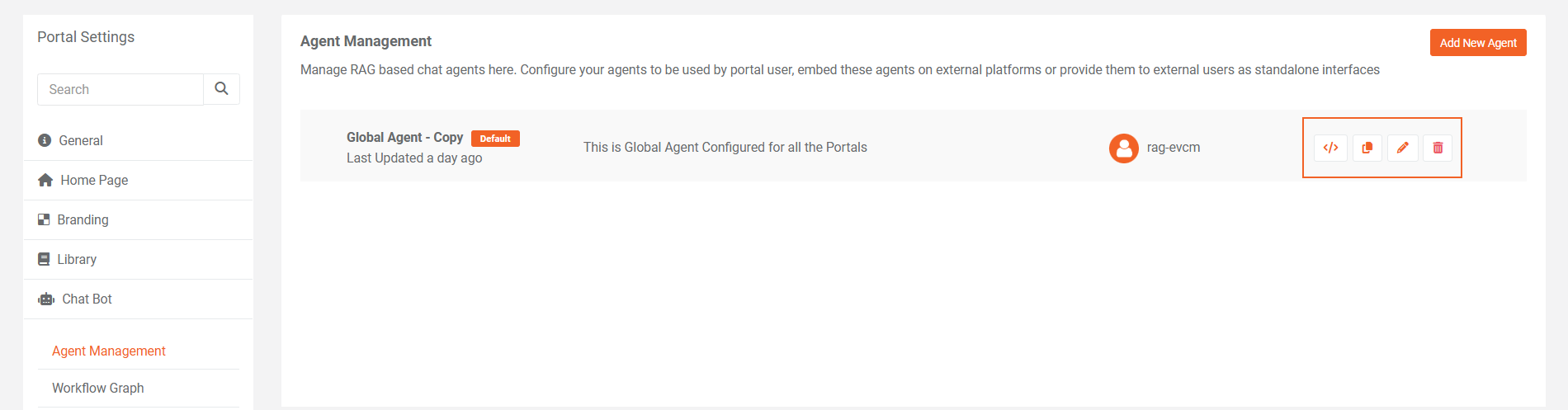
Edit Agent
Edit an existing agent to update its configuration without creating a new one. This option opens the agent configuration page with all current settings populated.
Common reasons to edit an agent:
- Update system prompts based on user feedback
- Modify knowledge base scope
- Change branding settings for external embeds
- Connect a different workflow
- Update suggested prompts to reflect new capabilities
All settings available during agent creation can be modified through the edit option. Changes take effect immediately after saving.
Clone Agent
Clone an agent to create a copy with identical configuration. This option is useful when you need a similar agent with minor modifications.
When you clone an agent:
- A new agent is created with all settings copied from the original
- The new agent is assigned a different identifier
- Both agents remain independent after cloning
Use cloning to:
- Create department-specific variations of a base agent
- Test configuration changes without affecting the original
- Set up agents for different audiences with similar requirements
- Maintain a backup configuration before making significant changes
After cloning, edit the new agent to make necessary adjustments.
Delete Agent
Delete an agent to remove it from the portal. This action is permanent and cannot be undone.
Before deleting an agent:
- Verify the agent is not set as the default for any portal
- Confirm no external applications depend on the agent's embed code
- Consider cloning the agent as a backup if you might need it later
When you delete an agent:
- The agent is removed from the Agent Management list
- Any embed codes for that agent stop functioning
- The connected workflow is not affected and remains available for other agents
Agent Widget Embed Code
The embed code option provides HTML code that allows you to embed the agent interface on external websites or applications. This extends agent interactions beyond the VIDIZMO portal.
Access Embed Code
Select the embed code option for any agent to view and copy the HTML snippet. The embed code includes all necessary references to load the agent widget.
Embed Code Usage
The embed code generates a chat widget that:
- Displays the agent interface with configured branding
- Connects to the same workflow and knowledge base as the portal version
- Uses the agent's system prompts and suggested prompts
- Respects all configured settings including citations and fallback messages
Considerations for Embedded Agents
When embedding agents on external platforms:
- Branding settings (header color, font family, logo) apply to the embedded widget
- Overlay settings determine how the widget appears on the external page
- Users accessing the embedded agent may have different permissions than portal users
- Network connectivity to the VIDIZMO platform is required for the widget to function
The embed code remains valid until the agent is deleted. Modifications to the agent configuration apply automatically to embedded instances.
Limitations
- Permanent deletion: Deleted agents cannot be recovered. Clone agents before deleting if you need a backup.
- Embed code dependency: External applications using an agent's embed code lose functionality when the agent is deleted.
- No bulk operations: Agents must be edited, cloned, or deleted individually.